
win10快捷方式小箭头怎么去掉?
win10快捷方式小箭头怎么去掉?图标上边带有小箭头是系统来区分软件属于正经的应用程序、文件还是快捷方式,那么想要去掉小箭头的话,要怎么操作呢?一起来看下具体的方法吧。

win10快捷方式小箭头怎么去掉?
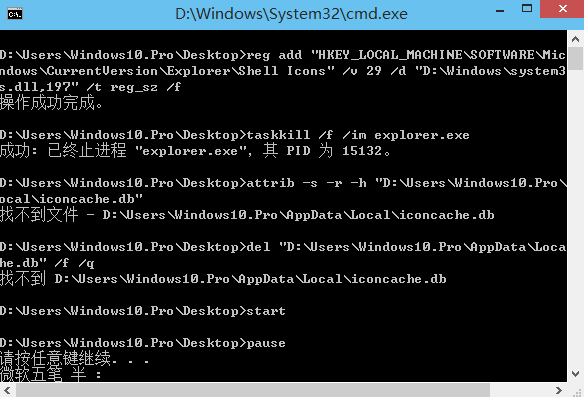
1、创建一个新的txt文本文档,将以下命令复制到该文本文档中并保存。
reg add “HKEY_LOCAL_MACHINESOFTWAREMicrosoftWindowsCurrentVersionExplorerShell Icons” /v 29 /d “%systemroot%system32imageres.dll,197″ /t reg_sz /f
taskkill /f /im explorer.exe
attrib -s -r -h “%userprofile%AppDataLocaliconcache.db”
del “%userprofile%AppDataLocaliconcache.db” /f /q
start explorer
pause
2、将文本文档重命名为带有后缀bat的批处理文件。
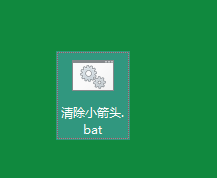
3、最后双击运行文件。
相关文章
- 老笔记本Win10系统_旧版笔记本Win10精简版系统
- win10系统如何安装虚拟网卡?
- win10系统缩放100太小125模糊的两种解决方法
- win10系统有网络打不开网页怎么办?
- Win10系统怎么通过命令实现自动关机?
- Win10系统安装版下载_Win10专业版64位纯净版ISO镜像
- Win10系统怎么新建网络连接 ?win10系统新建网络连接方法
- Win10系统steam好友网络无法访问怎么办?
- Win10系统纯净版下载_Win10 64位纯净版系统镜像[22H2版]
- 怎样将win10系统的音量显示条设置为竖条?
- 华硕原装Win10系统下载_ASUS华硕原装系统win10正版镜像下载
- 不带软件的win10纯净版gho免费下载
- 俄罗斯大神win10精简版在哪下载?
- 游戏专用Win10系统下载_Win10 64位专业优化增强版(永久激活)
- win10系统意外关闭崩溃怎么办?
- msdn里面win10哪个版本最好用?
相关推荐
-
顽石Win10 21H1 64位精简版(内置Admin) V2023

顽石Win10 21H1 64位精简版内存占用小,删除了不必要的功能服务和冗余文件,还会自动屏蔽广告,让用户的上网体验更好。集成了最新最全的驱动程序,尽可能发挥出计算机的最佳性能,不会出现蓝屏、无响应等现象。
-
小修Win10 22H2 LTSC 64位极限精简版 V2023

小修Win10 22H2 LTSC 64位极限精简版是一款精简过的操作系统,具备纯净、无广告、流畅的特点,集成了必备的运行库合集和.NET Framework 3.5,满足用户的办公、娱乐需求。采用最新的封装技术,安全无毒,用户可以放心下载。
-
twm000 Win10 64位优化精简版 V2023

twm000 Win10 64位优化精简版去除了大部分无用的功能和组件,系统变得更加精简,空间占用更小,安装起来更加迅速。twm000 Win10具备纯净、流畅的特点,还添加了很多人性化功能,更加符合用户的使用习惯。
-
Ghost Win10 64位五一纪念版 V2023

Ghost Win10 64位五一纪念版支持最新的封装技术,提供完善的驱动处理方式,极大地减少“内存不能为read”现象。还优化了系统不常用的服务和启动项,支持各类大型游戏,让用户的上网体验更好。
-
旧版笔记本Win10精简版系统 V2023
旧版笔记本Win10精简版系统在保留现有正式版所有功能的前提下,系统中的文件、通过对设置进行特定调整,实现更干净、更高效的系统体验。采用高级ghost技术打包,可跨平台安装,在pe和windows上都可以完美安装,操作流程一点也不复杂,初学者也可以简单完成。
-
系统之家win10简化版ltsc版 V2023
系统之家win10简化版ltsc版是一款非常实用的操作系统,在保持稳定运行的基础上,删除了很多不必要的功能服务。系统的兼容性非常强,无论是处理图像还是制作视频等等都能让你快速地操作,感兴趣的用户可以下载试试。